Editing a paragraph
Editing an Author-e document is performed by editing the so-called paragraphs  .
.
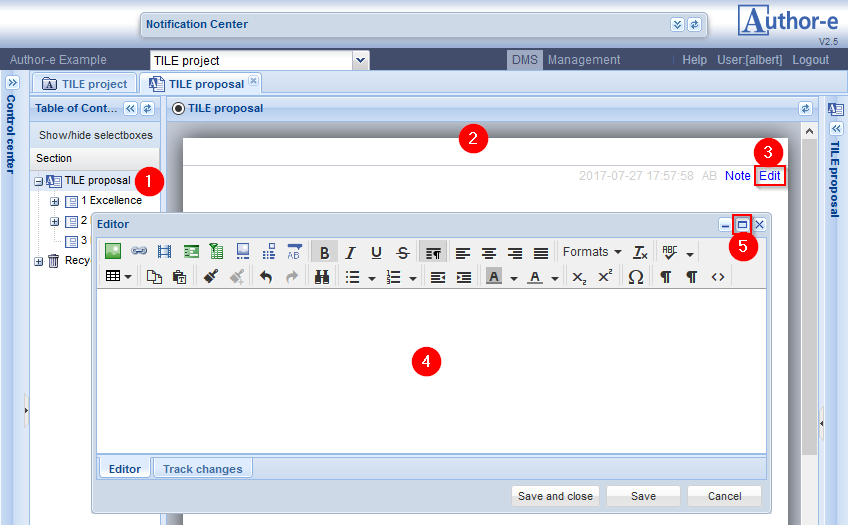
- For a selected section
 in the Table of Contents ...
 - ... the content of this section is shown in the right pane of the screen, the Section view pane.
- A section typically contains at least one paragraph, and by clicking the Edit button ...
- ... the (paragraph) Editor window is opened, and placed centralized on the screen.
- By clicking the Full screen icon
 the editor will cover the whole browser window.
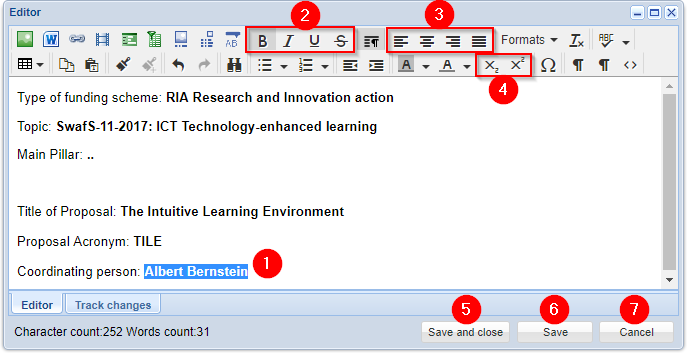
- In the white field of the Editor window any text can be typed.
Some basic layout functions: - By clicking the Bold, Italic, Underline or Strike-through buttons the selected text will be rendered accordingly.
- By clicking the Align left, Align center, Align right or Justify buttons the paragraph block will be aligned as selected
- By clicking the Subscript or Superscript buttons the selected text will be rendered accordingly.
The other buttons will be explained in the next sections - The Save button will save the typed content and allow further editing.
- The Save and close button will also close the Editor window
- The Cancel button will close the Editor window without saving the modifications